

Updated: August 2026
Every freelancer hits the same wall eventually: the work is piling up, and hiring help isn’t an option yet. That’s exactly the gap AI tools are good at filling — but the AI tool market in 2026 is loud, crowded, and full of $50/month “all-in-one” platforms that freelancers on a real budget don’t need.
I’m a developer who uses AI tools daily, for my own work and for testing what’s actually worth paying for. This list isn’t “50 AI tools you should try” — it’s the 7 that earn a spot in a tight freelance budget, one per job you actually need done, with real 2026 prices so there are no surprises at checkout.
How I picked these
Every tool on this list had to clear three bars: a genuinely useful free tier (or a price low enough it doesn’t matter), a clear single job it does better than a general chatbot, and no bloat — nothing built for teams of 50 that you’re paying to ignore.
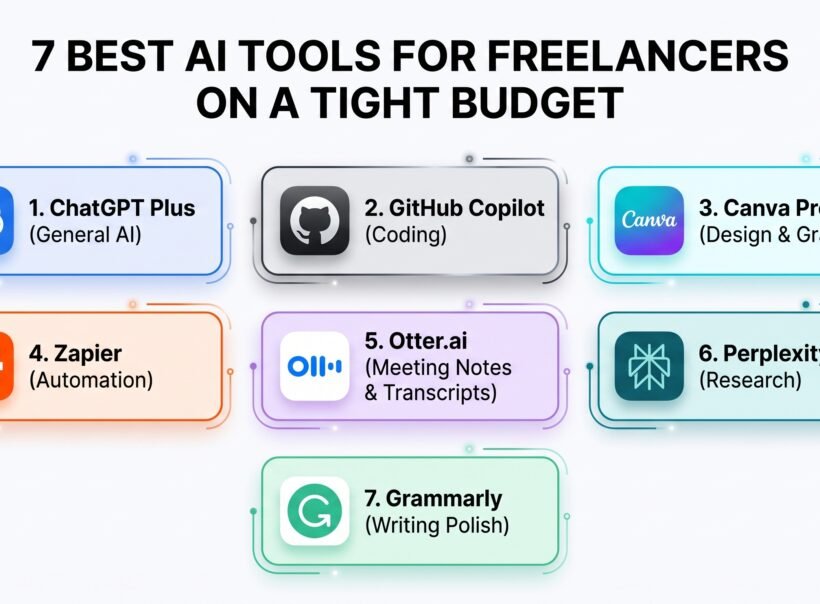
The quick list
| Tool | Job | Free tier | Cheapest paid plan |
|---|---|---|---|
| ChatGPT Plus | General assistant | Yes (limited) | ~$20/mo |
| GitHub Copilot | Coding | No | $10/mo |
| Canva Pro | Design & graphics | Yes (generous) | ~$12–18/mo |
| Zapier | Automation | Yes (100 tasks/mo) | ~$20/mo |
| Otter.ai | Meeting notes & transcripts | Yes (300 min/mo) | ~$8–17/mo |
| Perplexity Pro | Research | Yes (unlimited basic) | ~$17–20/mo |
| Grammarly | Writing polish | Yes (100 AI prompts/mo) | ~$12/mo |
Now the details on each.
1. ChatGPT Plus — the generalist you’ll use every day
Job: brainstorming, drafting, explaining things, general problem-solving. Price: ~$20/month. Free tier exists but hits limits fast if you use it for real work.
If you only budget for one AI subscription, this is usually it — not because it’s the best at any single thing, but because it’s good enough at everything: emails, proposals, quick research, thinking through a pricing decision out loud. I compared it in depth against Claude Pro (also $20/month) in a separate breakdown if your work leans more toward writing or coding specifically — for some freelancers, Claude is actually the better $20.
Best for: freelancers who want one flexible tool instead of five specialized ones, at least at the start.
2. GitHub Copilot Pro — coding, without the Cursor price tag
Job: autocomplete, code explanations, and an in-editor chat for developers. Price: $10/month, and code completions are unlimited even on the base plan — only chat and agent features draw from a monthly credit pool.
If you write code for clients, this is close to a no-brainer. It plugs into VS Code, JetBrains, Neovim, and more, so you’re not locked into one editor. Cursor (a popular alternative) is a genuinely great tool, but it starts at double the price for a workflow that’s more of a preference than a real upgrade for most freelance work. Start here; upgrade only if you hit a wall Copilot can’t solve.
Best for: freelance developers who want the cheapest serious coding assistant, not the flashiest one.
3. Canva Pro — design work without hiring a designer
Job: social graphics, client presentations, quick logo concepts, background removal. Price: ~$18/month billed monthly, or roughly $12/month billed annually. The free plan is genuinely usable — 50 AI credits a month for things like background removal and image generation.
Canva’s “Magic Studio” AI features (500 credits/month on Pro) cover most of what a non-designer freelancer actually needs: resizing a graphic for five platforms at once, removing a background, generating a quick concept image for a client deck. It won’t replace a real designer for brand work, but it removes the need to hire one for the small stuff.
Best for: freelancers who occasionally need to look like they have a design team.
4. Zapier — the automation that buys back your Mondays
Job: connecting your tools so they talk to each other without you copy-pasting between tabs. Price: free for 100 tasks/month (two-step automations only); paid plans start around $20/month for multi-step workflows and 750 tasks.
This is the tool that quietly saves the most time for the least glamour. New form submission → auto-added to your project tracker → client gets an email → task appears in your to-do list. Once it’s set up, it just runs. The free plan is enough to prove the concept before you pay for anything.
Best for: any freelancer manually moving information between two or more apps every week.
5. Otter.ai — never take meeting notes again
Job: transcribing and summarizing calls, meetings, and voice notes. Price: free for 300 minutes/month (30 min per conversation cap); Pro is roughly $8–17/month depending on billing cycle, with 1,200 minutes/month and 90 minutes per conversation.
Client calls are where scope creep and misunderstandings start — Otter gives you a searchable transcript and an AI summary of every call, so “didn’t we agree on three revisions?” becomes a 10-second lookup instead of a memory contest.
Best for: anyone who takes client calls and hates typing notes while talking.
6. Perplexity Pro — research that comes with sources
Job: fast, cited research instead of scrolling through ten browser tabs. Price: free tier has unlimited basic search; Pro runs ~$17–20/month depending on annual vs. monthly billing.
The difference between this and a general chatbot is the citations — every answer links back to where it came from, which matters when you’re researching for a client and need to show your work, not just hand over a paragraph you can’t source. The free tier alone covers most casual research; Pro is worth it once you’re doing it daily.
Best for: freelance writers, consultants, and anyone whose work involves “go find out about X” as a recurring task.
7. Grammarly — the last pass before you hit send
Job: catching typos, awkward phrasing, and tone problems before a client sees them. Price: free tier includes 100 AI prompts/month, which covers basic grammar and tone checks; Pro is roughly $12/month billed annually for deeper rewrites and plagiarism detection.
It’s not glamorous, but every freelancer who emails clients directly benefits from a second pair of eyes that never gets tired. If you want to see how it stacks up against cheaper competitors, I’ve got a dedicated comparison of Grammarly alternatives coming that’s worth checking before you commit to the paid tier.
Best for: anyone whose writing goes straight to a client’s inbox with no editor in between.
How to actually budget this
You do not need all seven on day one. Here’s a sane way to phase it in:
Start free: Zapier, Otter, Perplexity, and Grammarly all have usable free tiers. Run on those until you feel the limit, not before.
Add ChatGPT Plus first if you’re going to pay for anything — it’s the most broadly useful $20 you can spend.
Add Copilot the moment code is part of your paid work — $10/month pays for itself the first time it saves you twenty minutes.
Add Canva Pro only when you’re making graphics often enough that the free 50 credits/month run out.
Total realistic budget for a freelancer using all seven at the paid tier: roughly $100–110/month. Most freelancers land closer to $30–50/month, using two or three paid tools and free tiers for the rest.
Frequently asked questions
Do I need all 7 tools? No. Most freelancers use two or three paid ones and free tiers for the rest. Start with whichever tool removes your biggest weekly time sink.
What’s the single best value on this list? GitHub Copilot at $10/month if you code, or the free tiers of Zapier and Otter if you don’t — both are useful enough for free that they cost nothing to try.
Can I replace several of these with just ChatGPT Plus? Partially. ChatGPT can draft text and brainstorm, but it won’t automate your apps (Zapier’s job), transcribe a live call in real time (Otter’s job), or cite live sources (Perplexity’s job). Specialized tools still win at their one job.
Are there cheaper alternatives to any of these? Yes, for several — I’m covering budget alternatives to Zapier, Grammarly, and Jasper in separate posts. This list is the default pick for each job; the alternatives posts are for when the default doesn’t fit your budget or workflow.
Bottom line
The freelancers who get the most out of AI tools aren’t the ones with the most subscriptions — they’re the ones who matched one tool to one real bottleneck in their week. Start with whichever line item above made you nod, add ChatGPT Plus if you haven’t already, and reassess your stack every few months as your client work changes.