





Updated: August 2026
At some point every freelancer and small business owner hits the same wall: you’re manually copying a new form submission into a spreadsheet, then into an email, then into a project tracker — three tabs, one task, every single time it happens. That’s the exact problem both Zapier and Make exist to solve. They connect your apps so they talk to each other automatically, without you touching a single copy-paste.
The catch is that they solve it in genuinely different ways, at genuinely different prices, and the “obvious” choice (Zapier, because everyone’s heard of it) isn’t always the right one for your budget or your workflow. I’ve set up automations on both, so here’s the honest comparison — not the marketing-page version.
The short answer
- Choose Zapier if you want the simplest possible setup, the largest library of app integrations, and you’re willing to pay a bit more for that convenience.
- Choose Make if you’re comfortable with a slightly steeper learning curve in exchange for more automation power per dollar — branching logic, loops, and a visual canvas that Zapier’s linear “Zaps” can’t match.
- Most freelancers and small businesses on a tight budget end up happier with Make once they get past the first hour of setup — but Zapier’s simplicity is a real advantage if automation isn’t something you want to think hard about.
Here’s the detail behind that.
Price: not actually close, once you look at the free plans
Both tools have a free tier and both scale up from there, but the free tiers are not equivalent.
Zapier’s free plan gives you 100 tasks a month, but restricts you to two-step Zaps — one trigger, one action. No branching, no multi-step chains, no filters on the free tier. It’s enough to prove a single simple automation works, not to actually run your business on.
Make’s free plan gives you 1,000 operations a month (roughly ten times the free allowance) and, more importantly, lets you build up to 2 active scenarios that can include multiple steps, branching, and filters — the real automation logic, just capped in scale and speed (runs are limited to every 15 minutes, with a 5-minute max execution time per scenario).
Once you move to paid plans, the gap in what you pay for what you get stays wide:
- Zapier Professional starts around $19.99/month, unlocking multi-step Zaps, premium app connections, and AI-assisted fields — but the exact task allowance you get for that price depends on which tier you select (roughly 750 tasks/month at the entry point, scaling into the hundreds of thousands at higher tiers).
- Make Core starts around $12/month for 10,000 operations, with Pro at ~$21/month and Teams at ~$38/month adding priority execution, custom variables, larger file handling, and team roles — all still built around that same 10,000-operations base price point before scaling up.
The catch that actually matters: Zapier counts every action step as a task. A Zap with one trigger and three actions burns 3 tasks per run. Make counts operations similarly per module, but its scenarios tend to be more efficient per unit of work because of how branching and routing are structured — so the sticker prices above understate the real-world gap for anything beyond a single simple automation.
Reality check: pricing tiers and task/operation allowances change often on both platforms. Treat these numbers as an August 2026 snapshot and confirm the current tiers on zapier.com/pricing and make.com/pricing before you commit.
Round 1: Ease of use
This is where Zapier wins outright, and it’s not close.
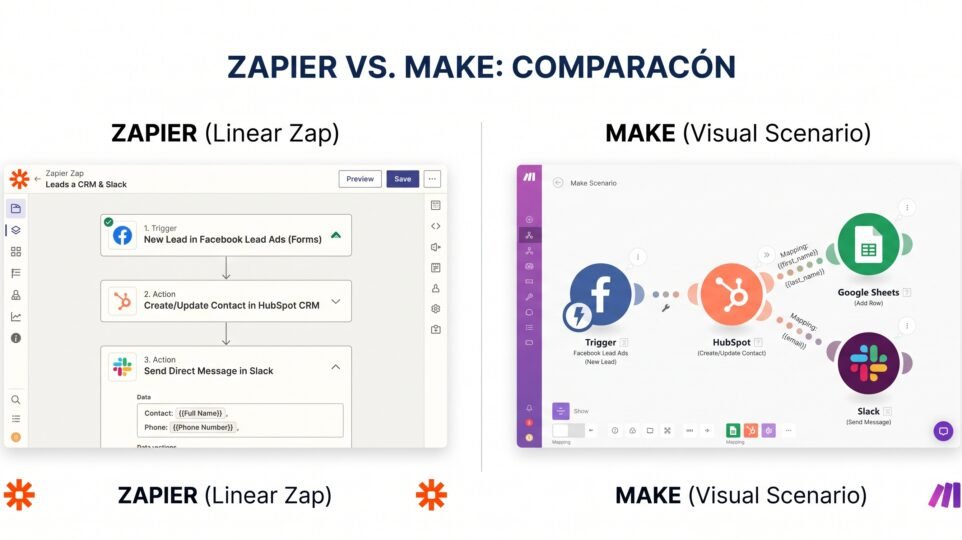
Zapier’s whole design philosophy is: pick a trigger, pick an action, connect them, done. It reads almost like a sentence — “when this happens, do that.” If you’ve never built an automation in your life, you can have a working Zap in under five minutes with zero learning curve.
Make uses a visual canvas where you drag modules onto a board and draw connections between them, closer to a flowchart than a form. It’s more powerful (see Round 2), but that power comes with a real learning curve — expect your first scenario to take longer than your first Zap, and expect a genuine “aha” moment a few scenarios in once the canvas clicks.
Winner for ease of use: Zapier, clearly, especially if you want to hand off automation setup to someone non-technical.
Round 2: Power and flexibility
Here the tables turn completely.
Zapier’s core structure is linear: one trigger, then a sequence of actions, one after another. You can add conditional logic and simple branching with add-on features, but it feels bolted on rather than native.
Make was built around branching, routers, loops, and iterators from day one. You can send one trigger down five different paths based on conditions, loop over a list of items, aggregate data from multiple sources, and visually see the entire logic of a complex automation on one screen instead of scrolling through a linear list of steps. For anything beyond “when X happens, do Y,” Make is simply the more capable tool.
Winner for power: Make, by a wide margin — this is the tool’s actual reason for existing.
Round 3: App integrations and ecosystem
Zapier has been around longer and has built the largest integration library in the automation space — thousands of apps, including a long tail of small, niche tools that smaller platforms simply haven’t bothered to build connectors for. If you use an obscure CRM or a small industry-specific tool, Zapier is more likely to already support it.
Make’s app library is smaller but still large and growing fast, and it covers essentially every mainstream tool a freelancer or small business actually uses day to day (Google Workspace, Slack, Notion, Airtable, Stripe, the major CRMs and email platforms). For most people, the gap only matters if you rely on something genuinely niche.
Winner for raw integration count: Zapier. For “does it support what I actually use”: usually a tie.
Round 4: Reliability and support
Both platforms are mature, stable products used by large companies, so uptime isn’t really a differentiator anymore. Where they differ is support access: Zapier’s free and entry paid tiers lean on self-serve help docs and community, with live chat/email support unlocked on paid plans. Make follows a similar pattern — better support access as you move up the pricing tiers, with priority execution added at the Pro/Teams level on top of support itself.
Neither is a reason to pick one over the other unless you’re running mission-critical automations for a client, in which case check the current SLA on whichever plan you’re considering.
The head-to-head, at a glance
| Zapier | Make | |
|---|---|---|
| Free plan | 100 tasks/mo, 2-step only | 1,000 ops/mo, 2 scenarios, multi-step |
| Entry paid plan | ~$19.99/mo | ~$12/mo |
| Billing unit | Tasks (per action step) | Operations (per module) |
| Interface | Linear, form-based | Visual canvas, flowchart-style |
| Branching / loops | Limited, add-on feel | Native, core feature |
| Learning curve | Very low | Moderate |
| App integrations | Largest library | Large, covers mainstream tools |
| Best for | Simplicity, niche apps | Complex logic, budget |
Who should choose Zapier
Pick Zapier if you want to set it and forget it with the least possible friction — a solo freelancer connecting a form to an email to a spreadsheet, someone who’s never built an automation before, or anyone whose workflow depends on a niche tool that only Zapier supports. You’re paying a premium for simplicity and reach, and for a lot of people, that premium is worth it.
Who should choose Make
Pick Make if your automation needs go beyond “when this, then that” — you want to route leads differently depending on their source, loop through a list of orders, combine data from three tools before acting on it, or you’re simply trying to get more done on a tighter monthly budget. The extra hour you spend learning the canvas pays for itself the first time you build something Zapier couldn’t do at all.
Should you use both?
It’s more common than you’d think, and not wasteful: some freelancers run Zapier for a couple of dead-simple, mission-critical connections (because “it just works” matters more than saving a few dollars there) and Make for everything more complex, where the savings and power add up. If your budget only stretches to one tool, though, most people on a tight budget get more automation per dollar out of Make.
Frequently asked questions
Is Make cheaper than Zapier? For the same monthly budget, generally yes — Make’s entry paid plan costs less and its free plan allows more actual automation (multi-step scenarios) than Zapier’s free plan, which is capped at two steps.
Which one is better for beginners? Zapier. Its trigger-then-action model is closer to plain English and has almost no learning curve, while Make’s visual canvas takes longer to feel natural.
Can I migrate my Zaps to Make later? Not automatically — there’s no one-click import between the two. You’d rebuild each automation manually in Make’s canvas, which is straightforward but takes some time for complex Zaps.
Do I need the paid plan of either tool? Not to start. Both free plans are genuinely usable for testing a single real automation. You’ll know it’s time to upgrade when you hit the task/operation ceiling or need multi-step logic the free tier doesn’t allow.
Which has more integrations? Zapier, by a meaningful margin — it has the largest app library in the automation space. Make covers the mainstream tools most freelancers and small businesses actually use, so the gap matters mainly if you rely on something niche.
Bottom line
Zapier sells you simplicity and the widest reach; Make sells you more logic and lower cost, once you’re willing to spend an extra hour learning the canvas. If you’ve never automated anything before and want it to just work, start with Zapier’s free plan. If you’re comfortable with a bit of a learning curve and want the most automation for your money, Make is the better twenty-dollar (or twelve-dollar) bill.
Either way, start on the free tier of whichever one you pick, build one real automation that saves you actual time every week, and only upgrade once you’ve outgrown it — not before.
Looking to automate more of your business without touching either of these? Check out my guide to the 7 best AI tools for freelancers on a tight budget, which covers where automation fits alongside the rest of your stack.